Übung 1 — Sie bauen Ihren eigenen Computer
Ziel dieser Übung
Sie planen im Tandem einen funktionsfähigen Computer für einen selbst gewählten Zweck – wie ein kleines Projekt: vom Szenario über die Anforderungen bis zur fertigen Stückliste mit Preisen. Ihr Ergebnis stellen Sie kurz im Plenum vor und übernehmen es in Ihr E-Portfolio.
Schritte im Überblick
1Zweck und Sinn: Szenario
2Anforderungen ableiten
3Warum ein Tower-PC?
4Was steckt drin?
5Stückliste mit Preisen
6Vorstellung im Plenum
7Mahara & Reflexion
Arbeitsform: im Tandem, ca. 30 Minuten, eine Karte pro Tandem auf dem Board.
Spickzettel: pc-anatomy.com zeigt, was in einem PC steckt – dort dürfen Sie jederzeit nachschauen.
Teil 1: Zweck und Sinn
Aufgabe 1 · Ihr Szenario Board
Wofür soll Ihr Computer später genutzt werden? Je nach Anwendungszweck braucht es ganz unterschiedliche Hardware – zum Beispiel Gaming, Büro & Studium, KI, Server, Video & Foto oder eine eigene Idee.
Beschreiben Sie Ihr Szenario in wenigen Stichworten:
- Wer nutzt den Computer – und wofür genau?
- Was ist besonders wichtig: schnell, leise, sparsam, günstig, klein …?
- Wie lange soll er halten – und was ist das Budget?
Teil 2: Anforderungen ableiten
Aufgabe 2 · Was braucht Ihr Szenario? Board
Überlegen Sie für jedes Kriterium: Braucht Ihr Szenario hier viel oder wenig – und warum?
| Kriterium | Beispiel: Büro & Studium | Ihr Szenario | Begründung |
|---|
| Rechenleistung (CPU) | gering bis mittel | | |
|---|
| Grafik (GPU) | integrierte Grafik reicht | | |
|---|
| Arbeitsspeicher (RAM) | 16 GB | | |
|---|
| Speicherplatz | SSD, 512 GB – 1 TB | | |
|---|
| Lautstärke & Strom | möglichst leise und sparsam | | |
|---|
| Budget | eher niedrig | | |
|---|
Teil 3: Warum ein Tower-PC?
Aufgabe 3 · Wartbarkeit, Aufrüstbarkeit, Modularität Board
- Wartbarkeit: Defekte Teile lassen sich einzeln tauschen.
- Aufrüstbarkeit: Später mehr RAM, eine größere SSD oder eine neue Grafikkarte nachrüsten.
- Modularität: Genormte Bauteile und Anschlüsse (ATX, PCIe, M.2, SATA) lassen sich frei kombinieren.
Notieren Sie in ein bis zwei Sätzen: Was davon ist für Ihr Szenario besonders wichtig? Was ist bei Laptop oder Smartphone anders?
Teil 4: Was steckt drin?
Aufgabe 4 · Komponenten erkennen
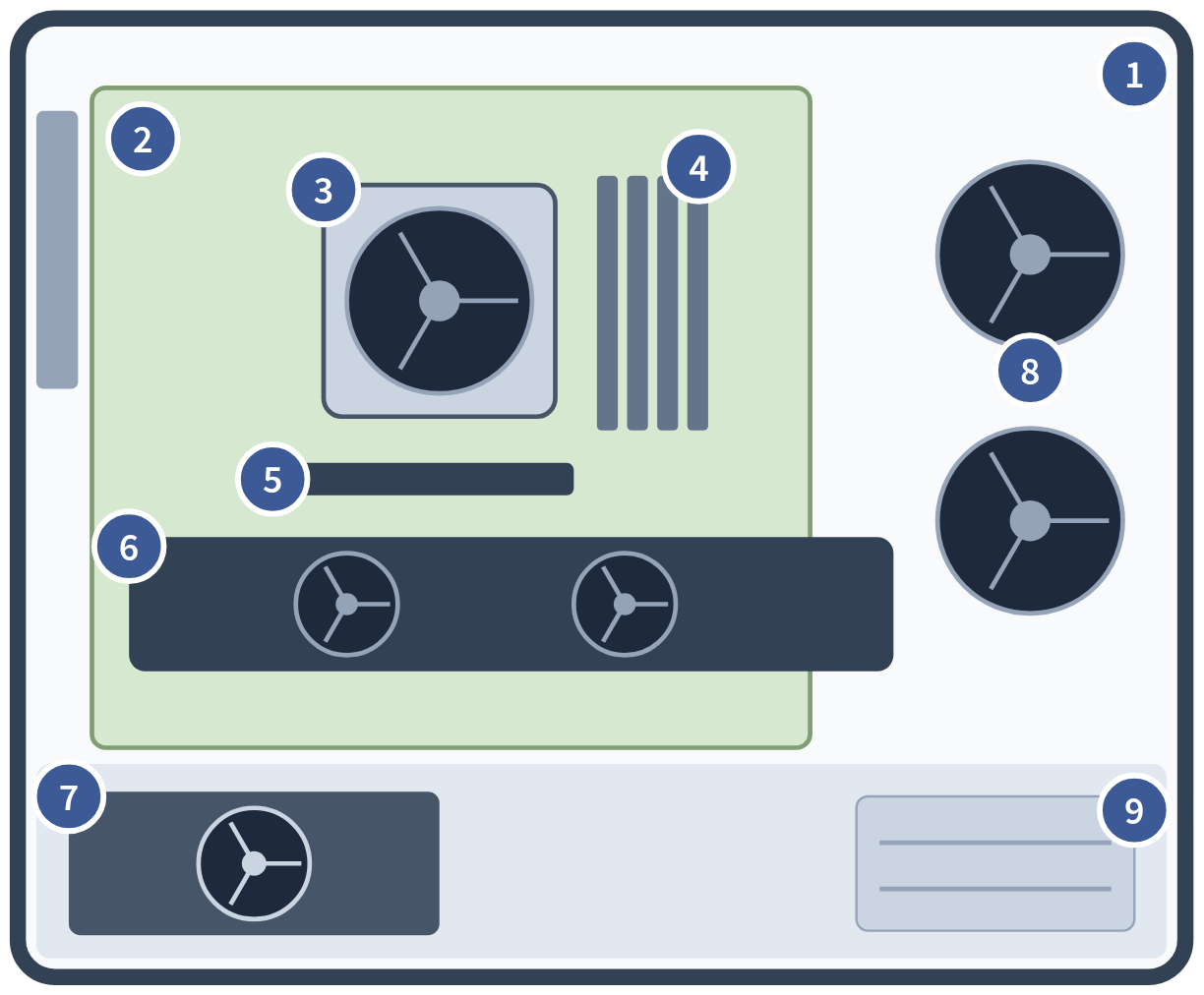
Welche Komponenten erkennen Sie im Schaubild? Ordnen Sie die Nummern zu – und überlegen Sie: Was davon braucht ein funktionsfähiger Computer unbedingt?

pc-anatomy.comSpickzettel: einen PC in 3D zerlegen und jedes Bauteil anklicken (Oberfläche auf Englisch).
Teil 5: Ihre Stückliste
Aufgabe 5 · Alles, was ein funktionsfähiger Computer braucht Board
Erstellen Sie die Stückliste auf Ihrer Board-Karte. Recherchieren Sie die Preise tagesaktuell in einem Shop und geben Sie den Link an.
| Komponente | Funktion | Marke | Modell | Link zum Shop | Preis |
|---|
| z. B. Prozessor (CPU) | rechnet, steuert | … | … | https://… | … € |
| … | … | … | … | … | … |
| … | … | … | … | … | … |
| … | … | … | … | … | … |
| Summe | | … € |
Passt alles zusammen?- CPU-Sockel ↔ Mainboard
- RAM-Typ (DDR4 oder DDR5) ↔ Mainboard
- Leistung des Netzteils ↔ Verbrauch von CPU und Grafikkarte
- Größe von Mainboard (ATX, mATX …) und Grafikkarte ↔ Gehäuse
- Nicht vergessen: Betriebssystem, Monitor, Tastatur, Maus
Teil 6: Board & Vorstellung im Plenum
Aufgabe 6 · Kurze Vorstellung (ca. 2 Minuten pro Tandem)
- Unser Szenario in einem Satz
- Die wichtigste Anforderung – und was daraus folgt
- Die schwierigste Entscheidung: welche Komponente – und warum?
- Gesamtpreis – und was wir später aufrüsten würden
Teil 7: E-Portfolio & Reflexion
Aufgabe 7 · Mahara-Seite und Reflexion Mahara
- Neue Seite für diese Lehrveranstaltung in Mahara anlegen, mit einem Abschnitt pro Sitzung. Mahara-Anleitungen
- Board-Karte übernehmen: Board → Ihre Karte öffnen → „Für Mahara“ → in den Abschnitt zu Sitzung 1 einfügen.
- Reflexion: Im Reflexionstool für Sitzung 1 die Abschnitte in eigenen Worten ausfüllen → „Vorschau generieren“ → „HTML kopieren“ → in Mahara in die HTML-Ansicht einfügen. Dort können Sie auch anonym kurzes Feedback geben.
- Teilen Sie Ihre Seite mit mindestens zwei Mitstudierenden.
Eigene Worte statt Kopieren: Das Portfolio ist Ihr persönliches Lerninstrument. Prüfen Sie KI-Ausgaben kritisch und geben Sie verwendete KI-Tools und Quellen an.
Exercise 1 — You Build Your Own Computer
Goal of this exercise
In pairs, you plan a working computer for a purpose of your choice – like a small project: from the scenario and the requirements to a complete parts list with prices. You briefly present your result in plenary and add it to your e-portfolio.
Steps at a glance
1Purpose: scenario
2Derive requirements
3Why a tower PC?
4What is inside?
5Parts list with prices
6Presentation in plenary
7Mahara & reflection
Format: in pairs, approx. 30 minutes, one card per pair on the board.
Cheat sheet: pc-anatomy.com shows what is inside a PC – you may look things up there at any time.
Part 1: Purpose
Task 1 · Your scenario Board
What will your computer be used for? Different purposes need very different hardware – for example gaming, office & studies, AI, server, video & photo or your own idea.
Describe your scenario in a few key words:
- Who uses the computer – and what for exactly?
- What is most important: fast, quiet, efficient, cheap, small …?
- How long should it last – and what is the budget?
Part 2: Derive requirements
Task 2 · What does your scenario need? Board
For each criterion, consider: does your scenario need a lot or little here – and why?
| Criterion | Example: office & studies | Your scenario | Reason |
|---|
| Processing power (CPU) | low to medium | | |
|---|
| Graphics (GPU) | integrated graphics are enough | | |
|---|
| Memory (RAM) | 16 GB | | |
|---|
| Storage | SSD, 512 GB – 1 TB | | |
|---|
| Noise & power | as quiet and efficient as possible | | |
|---|
| Budget | rather low | | |
|---|
Part 3: Why a tower PC?
Task 3 · Maintainability, upgradability, modularity Board
- Maintainability: faulty parts can be replaced individually.
- Upgradability: add more RAM, a bigger SSD or a new graphics card later.
- Modularity: standardised parts and connectors (ATX, PCIe, M.2, SATA) can be combined freely.
Write one or two sentences: which of these matters most for your scenario? What is different with a laptop or smartphone?
Part 4: What is inside?
Task 4 · Identify the components
Which components do you recognise in the figure? Match the numbers – and consider: which of them does a working computer definitely need?
pc-anatomy.comCheat sheet: take a PC apart in 3D and click on every component.
Part 5: Your parts list
Task 5 · Everything a working computer needs Board
Create the parts list on your board card. Research current prices in a shop and include the link.
| Component | Function | Brand | Model | Shop link | Price |
|---|
| e.g. processor (CPU) | calculates, controls | … | … | https://… | … € |
| … | … | … | … | … | … |
| … | … | … | … | … | … |
| … | … | … | … | … | … |
| Total | | … € |
Does everything fit together?- CPU socket ↔ mainboard
- RAM type (DDR4 or DDR5) ↔ mainboard
- Power supply wattage ↔ consumption of CPU and graphics card
- Size of mainboard (ATX, mATX …) and graphics card ↔ case
- Do not forget: operating system, monitor, keyboard, mouse
Part 6: Board & presentation in plenary
Task 6 · Short presentation (about 2 minutes per pair)
- Our scenario in one sentence
- The key requirement – and what follows from it
- The hardest decision: which component – and why?
- Total price – and what we would upgrade later
Part 7: E-portfolio & reflection
Task 7 · Mahara page and reflection Mahara
- Create a new page for this course in Mahara, with one section per session. Mahara tutorials
- Add your board card: board → open your card → “For Mahara” → paste it into the section for session 1.
- Reflection: fill in the sections of the reflection tool for session 1 in your own words → “Generate preview” → “Copy HTML” → paste into the Mahara HTML view. You can also give short anonymous feedback there.
- Share your page with at least two fellow students.
Your own words, not copy and paste: the portfolio is your personal learning tool. Check AI output critically and state the AI tools and sources you used.